


Most Ideal Customer Profile (ICP) worksheets focus on general guidelines. We believe that the more specific you can be about your customer, the easier it will be to build a process to acquire and retain them.
Many Founders describe their ICP the way they’d describe it to a friend at dinner: “mid-market SaaS companies that are growing fast.” But hand that to a rep staring at a list of 200 leads and they probably won’t know whether a 40-person company or a 4,000-person company counts as “mid-market.”
AI is good at the two things that make this exercise less painful: combing through a pile of closed-won and closed-lost deals for the actual pattern, and refusing to let you move on when your answer is still too soft to use. That’s what a Claude skill built around Stage 2’s Green/Yellow/Red ICP worksheet does. The skill walks you row by row and won’t sign off on a cell until it’s a rule. To show how it works, I ran the skill against a fictional company with illustrative deal data. The output gives you a sense of what this looks like.
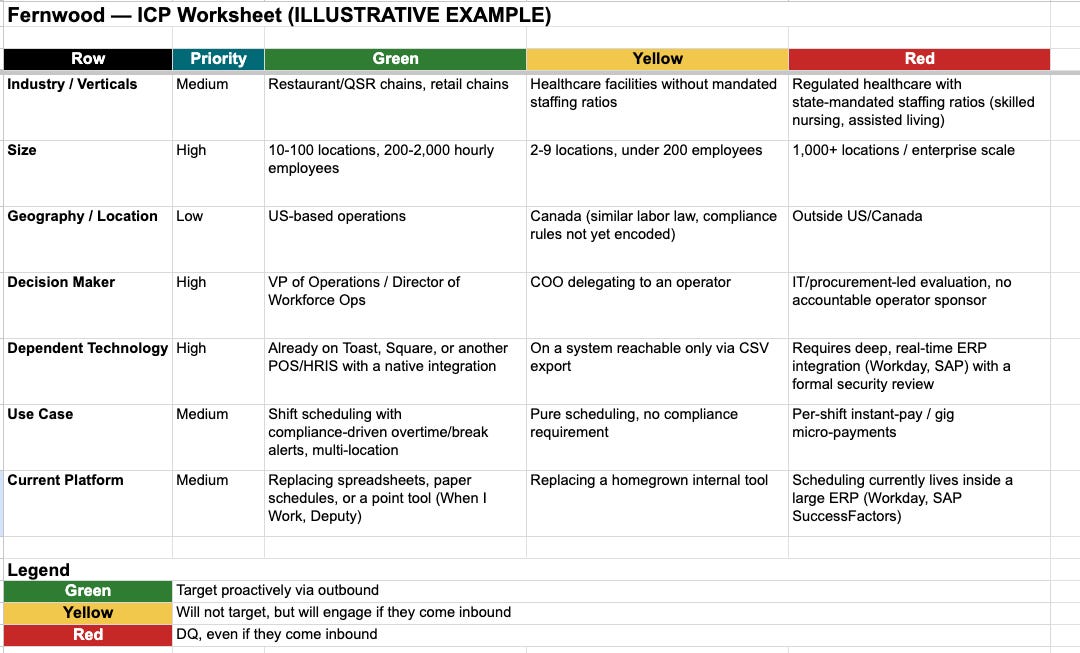
The setup
You’ll need Claude with the ICP Worksheet Builder skill enabled, and whatever deal data you’ve got. A CRM export is best, but you could also just use a list of your best-fit customers and worst-fit customers (either churned or closed lost).
Step 1: Load the skill and bring your deal data
If you have a CRM, export your last 30 closed-won and closed-lost deals and attach it. Then ask:
“Help me fill out my ICP worksheet. Here’s an export of our closed deals from the last two quarters — some are wins, some are losses, and I want to understand the pattern behind each.”
Step 2: Let it find the Green pattern first
Green is usually the easy row — it’s how you already talk about your best customers. Claude will ask what your closed-won accounts actually have in common depending on industry, size, buyer, and use case, and push you past a label (“mid-market”) to a number (“50–500 employees”).
Step 3: Interrogate the losses for Yellow vs. Red
This is where many ICP docs fall apart. Everything that isn't a clean Green gets dumped into 'not ideal' and left there. Claude will ask what was different about the deals that didn’t work, and specifically whether that difference cost you something real. Churn, refunds, a support fire (that’s Red). Customers that may work due to something specific (that’s Yellow).
“These three accounts churned within 90 days of closing — what did they have in common that our best customers don’t?”
Step 4: Assign Priority — and let it push back
Not every row matters equally. Claude will ask which 2-3 rows would actually change a rep’s go/no-go call, versus which are just nice-to-know context. If you can’t name a reason a row deserves top priority, it probably doesn’t.
Step 5: Pressure-test against real accounts before you ship it
Take 5 real customers (including one that surprised you, good or bad), and check whether the finished worksheet sorts them where they actually landed. If a customer you’d call a great fit falls out as Yellow, the criteria aren’t calibrated yet. Fix the row, don’t ignore the miss.
What good looks like
A finished row reads something like “50–500 employees, Series A–C” in Green, “500- 1,000 employees” in Yellow, and “pre-seed, no dedicated RevOps hire” in Red, not “small companies” versus “companies that aren’t ready yet.” Every cell should be something a rep could apply cold, in ten seconds, without calling you.
Watch-outs
Green creep. If more than half your customer base technically qualifies as Green, the row isn’t discriminating between anything.
Red without teeth. Red should cost you something specific — churn, refunds, a support burden. If the honest reason is “just not our favorite,” that’s Yellow, not Red.
The takeaway
The hard part of this process is writing answers specific enough that a rep can check them against a real prospect and know right away if it should be green or not. That's where AI helps: it keeps reps focused on the green prospects, the ones most likely to actually close.